
Table of Contents
Be honest: how long do you spend on a meta description? For most people, it’s about thirty seconds. They paste in a few keywords and move on. That’s a missed chance. Your meta description is the little pitch under your title in the search results, and it often decides whether someone clicks your page or the one right below it.
Here, I’ll walk you through the meta description best practices I follow. You’ll see real meta description examples, learn how to write a meta description step by step, and get clear rules on meta description length. Whether you’re new to meta description SEO or cleaning up a big website, you can use all of it today.
By the end, you’ll have a simple process, a checklist, and examples you can adapt to your own pages.
What Is a Meta Description?
A meta description is a short piece of HTML that sums up a page. Search engines often show it under your title and URL. In your page’s code, it looks like this:
html
<meta name=”description” content=”A short, helpful summary of what this page offers.”>
You probably won’t touch the code. Most content management systems and SEO plugins give you a simple box to type in.
Is a Meta Description a Ranking Factor?
Not directly. Google has said for years that meta descriptions don’t affect rankings, so cramming keywords into them won’t lift your position.
Still, there’s a catch. A better description earns more clicks from the same ranking spot, and more clicks mean more traffic. That’s the real payoff of meta description SEO. You’re not trying to impress an algorithm. You’re trying to convince a person.
Why Meta Description SEO Still Matters in 2026
Search results keep getting busier. Rich features, ads, and answer boxes all fight for attention. In that crowd, your snippet has one job: give people a clear reason to pick your page.
A strong description helps in three ways:
- More clicks. A specific promise beats a vague one every time.
- Better-fit visitors. When you set honest expectations, the people who click are more likely to stick around.
- A sharper match. Google often bolds words that match the search, which helps your result stand out.
Some platforms also use it as a backup for link previews when no other preview text exists. That’s a nice extra, but it isn’t the main reason to care.
Meta Description Best Practices for SEO in 2026
These are the meta description best practices I use on every page. Work through them in order, and you’ll dodge most of the common problems.
1. Start With Search Intent
Before you write anything, ask yourself what the searcher wants. Someone typing “how to fix a leaking tap” wants steps. Someone typing “plumber near me” wants a service they can trust and contact. Your description should meet that need in a single glance.
- Informational: Promise a clear answer or takeaway.
- Commercial: Point to comparisons, features, or expert advice.
- Transactional: Mention the offer, the product, or the next step.
- Local: Name the place and the service.
2. Choose One Primary Keyword
Pick one main keyword for the page and use it once. Put it near the start if it fits naturally. Google often bolds words that match the search, so your keyword can help your result catch the eye.
Saying it five times won’t help. That’s the heart of good meta description SEO: relevance beats repetition.
3. Lead With the Main Benefit
People skim search results. They read a few words, then decide. So put the benefit in those first words, not your company name or a vague opener.
4. Write for Clicks, Not for Bots
A description stuffed with keywords sounds like spam, and people scroll right past it. Try this instead: explain the page the way you would to a friend. Use plain words, short sentences, and one clear idea.
5. Use Action Language
Verbs like learn, compare, find, get, and discover tell people what to expect. Add a gentle call to action when it fits, such as “See the full checklist” or “Get a free quote.” Skip big claims like “the best ever” unless you can prove them.
6. Keep the Meta Description Length in Check
Aim for roughly 140–160 characters, and put your most important words first. The next section has the details.
7. Make Every Description Unique
Duplicate descriptions waste your chance to pitch each page, and they make your results look identical. On a big site, start with your most important pages and work your way down the list.
8. Match the Description to the Page
Only promise what the page delivers. Say your description offers a “free template,” but the page asks for payment first. Visitors will leave fast. Honest descriptions build trust, and trust brings people back.
9. Read It Out Loud
Say it out loud. If it sounds awkward, rewrite it. A good description sounds like something a real person would actually say.
Meta Description Length: How Long Should It Be?
Here’s the truth about meta description length: Google doesn’t publish a fixed limit. It trims snippets by pixel width, not character count, and what you see changes from device to device. So treat any number as a guide, not a rule.
A safe rule of thumb looks like this:
| Device | Rough safe range |
| Desktop | About 150–160 characters |
| Mobile | Often closer to 120 characters |
Because of that, I keep my most important words within the first 120 characters. If the ending gets cut off, the pitch still works.
Two quick tips:
- Letter width matters. Wide letters like “W” and “M” take up more room. Two descriptions with the same character count can get cut at different points.
- Don’t pad. A clear 110-character description beats a bloated 160-character one.
Most SEO plugins and plenty of free tools include a meta description length checker. Use one as a guide, then trust your own eyes on how the result reads.
How to Write a Meta Description, Step by Step
If you’re wondering how to write a meta description from scratch, here’s the process I follow on every page.
- Identify the page’s search intent. Decide whether the reader wants to learn, compare, buy, or find a local provider.
- Choose the primary keyword. Pick the one phrase the page targets most clearly.
- Highlight the main benefit. Ask what the reader gains from this page, and write that down in one sentence.
- Write naturally for clicks. Turn that sentence into plain, friendly copy. No stuffing.
- Keep it around 140–160 characters. Trim extra words and put the key message first.
- Make it unique and relevant. Check that no other page on your site uses the same text.
- Test the combination. Make sure the keyword, the benefit, and the call to action work together. If one feels forced, rewrite it.
Once you know how to write a meta description for one page, the rest go much faster.
Meta Description Examples: Weak vs. Better
Meta description examples teach faster than rules, so let’s put a few side by side. The first one comes from a local SEO service page. The others are samples I wrote to show the pattern.
Weak:
“SEO services in Kochi. Best SEO services, SEO expert, SEO agency in Kochi.”
Better:
“Boost your online visibility with SEO services in Kochi, including keyword research, on-page SEO, local SEO, and content optimization.”
See the difference? The weak version repeats one phrase and never says why anyone should click. The better version names the benefit and lists what’s included, so the reader knows exactly what they’ll get.
| Page type | Weak | Better |
| How-to guide | “How to fix a leaking tap. Fix leaking tap, leaking tap repair.” | “Fix a dripping tap yourself with this step-by-step guide. See the tools you need and the mistakes to avoid.” |
| Blog post | “Blog about running shoes. Best running shoes, buy running shoes.” | “Not sure which running shoes suit you? Compare cushioning, fit, and price in this plain-English buying guide.” |
| Product page | “Blue ceramic mug, 350 ml, dishwasher safe, buy now.” | “A 350 ml ceramic mug that keeps drinks warm and is safe for the dishwasher. Pick your colour and order today.” |
All of these meta description examples follow the same pattern:
- The weak versions repeat keywords or copy raw specs.
- The better versions state a benefit, add a specific detail, and hint at the next step.
Fill-in-the-Blank Templates
Feel free to copy these and swap in your own details:
- Guide: “Learn [topic] with this step-by-step guide. Get [takeaway] and avoid [common mistake].”
- Service: “[Benefit] with [service] in [city], including [feature 1], [feature 2], and [feature 3].”
- Product: “[Product] that [main benefit]. [Key feature]. [Next step].”
- Comparison: “Compare [option A] and [option B] on [criteria]. See which fits [audience].”
Common Meta Description Mistakes
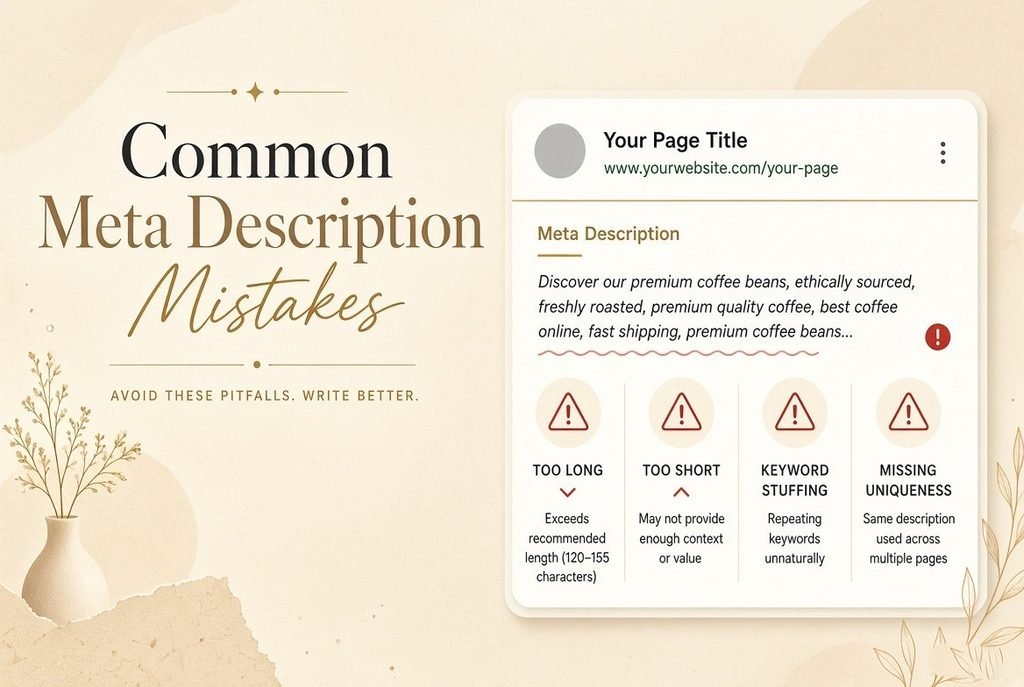
The mistake I see most often is keyword stuffing with no reason to click. The description repeats the target phrase, but it never tells the reader what’s actually on the page.
Here are a few others that show up again and again:
- Leaving it empty. You hand the snippet over to Google’s guess.
- Copying the same text across many pages. Every result looks the same.
- Writing too long. The ending, and often your call to action, gets cut off.
- Promising more than the page delivers. People leave quickly, and trust drops.
- Ignoring search intent. A sales pitch on an informational page misses the mark.
- Opening with “Welcome to…” or your brand name. You waste the most visible words.
Avoiding these errors is half the battle in meta description SEO.
Why Google Sometimes Rewrites Your Meta Description
Here’s something many beginners don’t expect: Google doesn’t always show the description you wrote. It may rewrite it based on the search query and the content on your page.
When that happens, I don’t fight it. Instead, I make sure the page content matches the search intent and the target keyword. That way, Google has relevant text to choose from. A few habits help:
- Put a clear summary near the top of the page.
- Use headings that mirror the questions people ask.
- Keep your written description consistent with what the page actually says.
This varies by query, so don’t be surprised when you see your own description for one search and a different snippet for another.
Meta Description vs. Title Tag
Think of your title tag as the headline and your meta description as the pitch under it. They should work as a team, not repeat each other.
If the title names the topic, use the description to add the benefit or a specific detail. And if the title already includes the keyword, you don’t need to force it in again. [Internal link: your SEO title tags guide.] For more on titles, check out Google’s guidance on title links.
Meta Description Best Practices by Page Type
The core meta description best practices stay the same. What changes is the emphasis, depending on the page.
- Homepage: In one sentence, say what you do and who it’s for.
- Blog post: Promise a clear takeaway, not just a topic label.
- Service page: Name the service, the location if it’s local, and what’s included.
- Product page: Lead with the main benefit, then add one standout feature.
- Category page: Show what shoppers can find and how you help them choose.
- Local page: Include the area and one good reason to trust you.
Can AI Tools Help You Write Meta Descriptions?
They can help with first drafts. Paste in a page summary, ask for three options, and see what you get. Just treat the result as raw material, not a finished product.
Generic phrasing, repeated openings, and made-up claims are common problems. So edit for accuracy and voice, and make sure each description stays unique across your site.
If you’re still learning how to write a meta description, a tool’s draft is a fine starting point. Just finish it yourself.
How to Audit Your Existing Meta Descriptions
You don’t have to rewrite everything at once. Start with a simple audit:
- Crawl your site with an SEO crawler and export every title and description.
- Flag the missing, duplicate, and overlong ones.
- Sort pages by impressions in Google Search Console, so you fix the most visible pages first.
- Rewrite the top 10–20 using the steps above.
- Save the old text and the date so you can compare results later.
An audit is the fastest way to improve meta description SEO across a whole site. [Internal link: your SEO services page.]
How to Test Whether Your Meta Descriptions Work
You don’t need fancy tools. The Performance report in Google Search Console does the job:
- Note the page’s current clicks, impressions, and click-through rate (CTR).
- Rewrite the description.
- Wait a few weeks, then compare CTR for the same page over the same length of time.
Read the results with care. Seasonality, ranking changes, and Google rewrites can all shift CTR, so one test isn’t proof. Look for a pattern across several pages before you draw conclusions.
Quick Meta Description Best Practices Checklist
- It matches the page’s search intent.
- It uses the primary keyword once, naturally.
- It names a clear benefit.
- It runs about 140–160 characters, with key words first.
- It’s unique to this page.
- It includes a soft call to action where it fits.
- It reads like a human wrote it.
- The page content backs it up.
FAQs
What are the most important meta description best practices?
Match the page’s search intent, lead with the benefit, and use your keyword once. Keep the text around 140–160 characters. Above all, make each description unique and honest.
What is the ideal meta description length?
Aim for about 140–160 characters. Google has no fixed limit, and mobile results often show less, so put the key message first.
Does meta description SEO still matter in 2026?
Yes, but not for direct rankings. It matters because a clear description can raise your click-through rate from the same position.
Where can I find good meta description examples?
Search your own target keyword and study the top results. Notice which descriptions make you want to click, and why. Then adapt the pattern to your page instead of copying the wording.
Are meta descriptions a ranking factor?
Not directly, according to Google. They influence clicks, and clicks influence traffic.
Can I use the same meta description on multiple pages?
I’d avoid it. Each page needs its own description that fits its content.
Why does Google show a different description than mine?
Google may rewrite it to better match the search query and the page content.
Looking for the best digital marketing freelancer in Kochi to grow your business online? I help businesses build a strong digital presence through customized digital marketing strategies, including SEO, social media marketing, content marketing, Google Ads, and website optimization. My approach focuses on understanding your business, target audience, and goals to create practical strategies that improve online visibility, attract the right audience, and generate meaningful results.