
Table of Contents
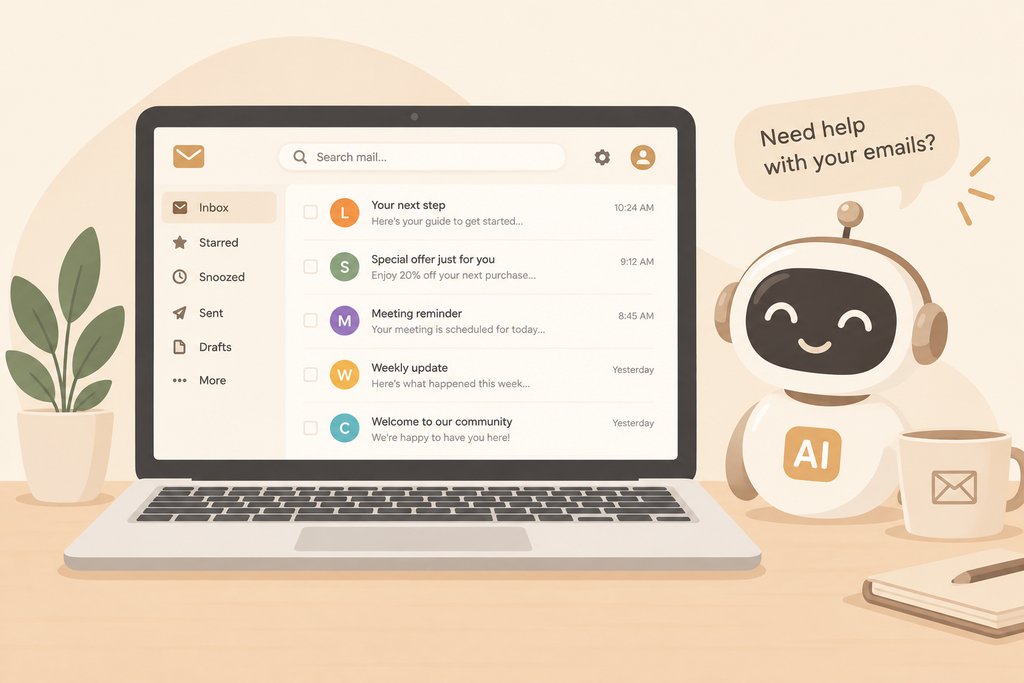
AI email marketing sounds like a shortcut. Type a prompt, get a subject line, hit send. But if you are new to email, that shortcut can lead straight to the spam folder.
I am still learning this craft myself. I use ChatGPT to brainstorm AI email subject lines and draft email copy, and it saves me a lot of time. I have not sent a full campaign yet, and that is exactly why I am being careful. I am studying authentication for better email deliverability, building a clean list, and planning small test batches first.
This guide shares what I have learned so far, what the official sources say, and the simple plan I follow. If you are a beginner too, you can use it as a starting point.
What Is AI Email Marketing?
AI email marketing means using AI tools to help plan, write, personalize, and schedule your emails. The tools can suggest subject lines, rewrite copy in a different tone, group subscribers into segments, and trigger emails based on behavior.
Here is the key point: AI assists you. It does not replace your judgment. Your audience, your offer, and your brand voice still come from you.
Why AI Email Marketing Matters Right Now
Email is still one of the most direct ways to reach people who already trust you. Social feeds change, but an inbox stays yours. The problem is that inboxes are crowded, and readers decide in a second whether to open or delete.
That is where AI email marketing earns its place. It speeds up the slow parts of the job: brainstorming, drafting, sorting subscribers, and timing. A task that used to take an afternoon can now take an hour.
But speed has a catch. Everyone has access to the same tools, so generic messages are everywhere. The advantage goes to people who combine AI speed with real knowledge of their audience. Smart email marketing automation and email personalization with AI only work when the strategy behind them is sound. And none of it matters if email deliverability is weak, because an email that never reaches the inbox cannot earn a click.
Where AI Helps Most
Three areas give beginners the biggest return.
1. AI Email Subject Lines and Copy
AI is great at volume. Ask for 15 subject line ideas in two minutes, and you will find two or three worth testing. It also helps when you are stuck on a blank page.
The quality of AI email subject lines depends on your prompt. A vague request gets a vague answer. Give the tool context instead:
- Who the audience is (new subscribers, past buyers, free trial users)
- What the email offers, in one sentence
- The tone you want (friendly, direct, playful)
- Words or claims to avoid, such as “free,” “guaranteed,” or all caps
- A length limit, such as under 50 characters
Then ask for 15 options in different styles: a question, a benefit, a number, and a curiosity hook. Pick two or three, edit them by hand, and run an A/B test. That is the safest way to learn which AI email subject lines actually work for your list.
2. Email Personalization with AI
Personalization goes beyond “Hi [First Name].” Good email personalization with AI means matching the message to what the reader actually cares about. That could be a product they viewed, a topic they clicked, or a stage in their journey.
Start with segmentation. Email personalization with AI works best when it sits on top of simple email segmentation. Before you ask AI to write anything, split your list into groups:
- New subscribers who have not bought yet
- Repeat customers
- People who clicked on a certain topic or product
- Inactive subscribers who have not opened in 90 days
Then write one version of the message for each group. A welcome email should sound nothing like a win-back email for someone who went quiet. AI can draft each version quickly, and you adjust the details.
Also avoid creepy personalization. Mentioning a product someone viewed is helpful. Quoting their browsing history back to them is not.
3. Email Marketing Automation
Automation sends the right email at the right time without manual work. Common starter flows include:
- A welcome email when someone subscribes
- A reminder when someone leaves items in a cart
- A follow-up after a purchase or download
AI can draft these emails and suggest send times. You still decide the logic and review every message.
Email marketing automation is easier to understand with a real example. Here is a simple three-email welcome series you can build in most email tools:
- Email one (right away): Thank the subscriber, deliver what you promised, and explain how often you will write.
- Email two (day 3): Share your most useful content or a short story about your brand.
- Email three (day 7): Make a soft offer, or ask a question to start a conversation.
Ask AI to draft each message, then rewrite them in your own voice. Keep the series short at first. You can add branches later, such as a different follow-up for people who clicked and people who did not. Good email marketing automation stays simple until you have enough data to justify more.
The Problem with Generic AI Output

When I asked ChatGPT for promotional subject lines, one of the first results was “Special Offer Just for You – Don’t Miss Out!” It reads fine. But it says nothing specific, and it uses the kind of urgency language that spam filters and readers both distrust.
Generic AI output is the easiest mistake to make. The fix is simple: add real details before you send.
Here is a quick example for an imaginary online coffee shop:
| Generic AI Version | Human-Edited Version |
|---|---|
| Special Offer Just for You – Don’t Miss Out! | Your favorite dark roast is 15% off until Friday |
| Exclusive Deal Inside! | 3 ways to brew better coffee at home |
| Last Chance to Save Big! | Still thinking about that grinder? |
The edited versions are specific, honest, and relevant. They sound like a person wrote them, because one did.
Email Deliverability: How to Reach the Inbox
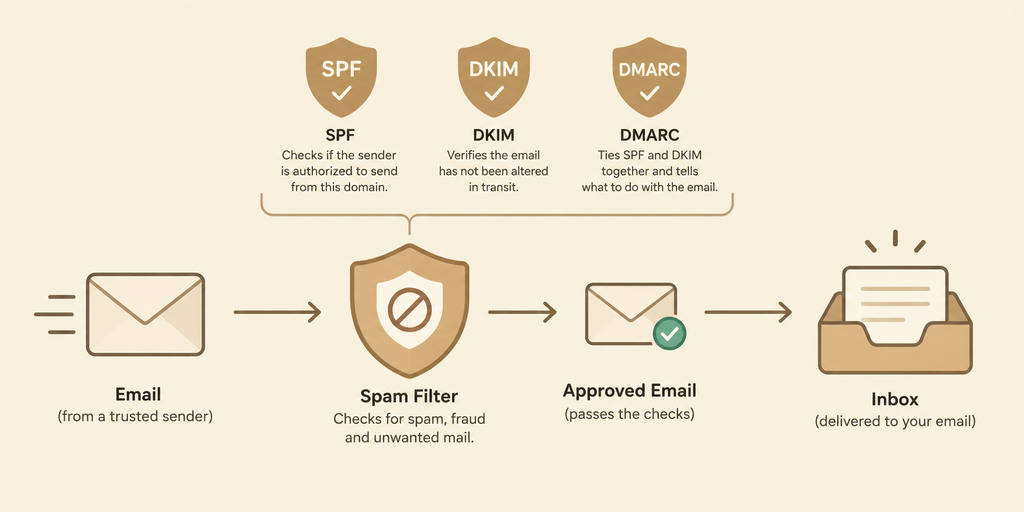
Great copy means nothing if your email lands in spam. Email deliverability is about earning trust with mailbox providers like Gmail, Yahoo, and Outlook. AI does not fix this for you, so these basics matter most.
Set Up Email Authentication
Authentication proves your emails really come from you. Set up three records for your sending domain:
- SPF lists the servers allowed to send email for your domain.
- DKIM adds a digital signature to your messages.
- DMARC tells providers what to do if SPF or DKIM checks fail.
Google’s email sender guidelines explain these requirements in detail. Bulk senders (those sending thousands of messages per day to Gmail accounts) must authenticate their email, offer easy unsubscribing, and keep spam complaint rates low. Google advises staying under 0.1% and never reaching 0.3%. Even if you send fewer emails, following the same rules is smart. Rules can change, so check the current guidelines before you launch.
Build a Clean List
A small, engaged list beats a large, cold one. Only email people who opted in. Never buy a list. Buying one is the fastest way to get complaints and damage your sender reputation.
Test Small Batches First
Do not send your first campaign to everyone. Send it to a small group, check the results, and then expand slowly. This protects your reputation while you learn.
Make Unsubscribing Easy
A visible unsubscribe link feels risky, but it protects you. A subscriber who cannot leave will hit the spam button instead, and that hurts you far more.
Warm Up Your Sending Domain
A brand-new domain has no reputation, so mailbox providers treat it with caution. Warm it up slowly. Start with a few dozen of your most engaged contacts, then raise your volume over several weeks. A sudden jump from zero to thousands of emails looks like spam behavior and can hurt email deliverability for a long time.
Avoid Spam Triggers in AI-Written Copy
Spam filters look at far more than a few banned words, but sloppy copy still raises flags. Watch for:
- All caps and heavy use of exclamation marks
- Pushy phrases like “Act now” or “Don’t miss out”
- Subject lines that do not match the email inside
- One huge image with almost no text
- Broken links, or too many links
AI tools often fall into these habits because they copy the style of thousands of ordinary promotions. Read your draft out loud. If it sounds like a pushy ad, rewrite it before it affects your AI email marketing results.
Keep Your List Healthy
Remove contacts who have not opened or clicked in six months, or try one re-engagement email first. Sending to people who ignore you lowers your engagement and sends a bad signal to mailbox providers. A smaller list with strong engagement protects email deliverability better than a big list that never responds.
A Simple Beginner Workflow for AI Email Marketing
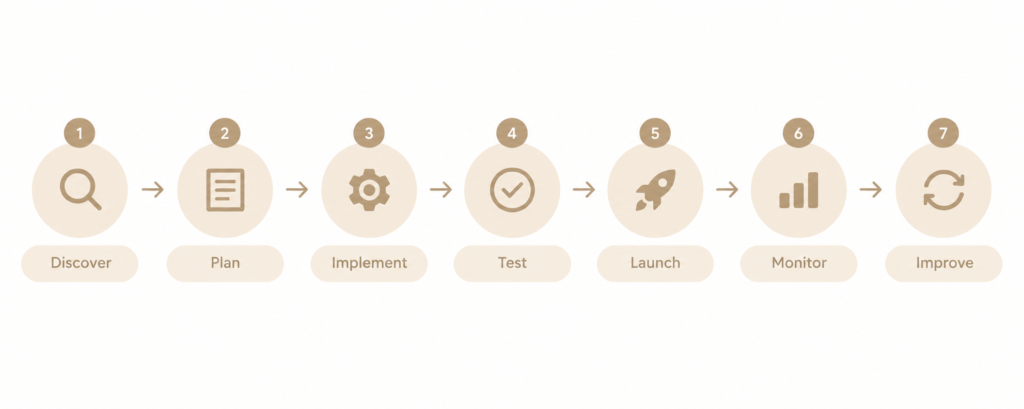
This is the process I am following. It keeps AI useful and keeps me in control.
- Define your audience. Decide who the email is for and what they want.
- Ask AI for ideas. Generate 10 to 15 subject lines and a rough draft.
- Edit like a human. Add specific details, remove hype words, and match your voice.
- Check authentication. Confirm SPF, DKIM, and DMARC are active before sending.
- Send a small test batch. Start with a small, engaged segment.
- Review the results. Look at open rate, click rate, unsubscribes, and spam complaints.
- Improve and repeat. Keep what worked, drop what did not, and scale slowly.
Prompts You Can Use for AI Email Marketing
Prompts are where many beginners get stuck. Here are three starting templates. Replace the brackets with your own details.
- Subject lines: “Write 10 subject lines under 50 characters for [audience] about [offer]. Use a friendly tone and avoid spam trigger words.”
- Welcome email: “Draft a short welcome email for new subscribers of [brand]. Thank them, explain what they will receive, and ask one question to start a conversation.”
- Rewrite for a segment: “Rewrite this email for [segment]. Keep it under 150 words and focus on [their main interest].”
After you get the output, edit it. Add one real detail that only you know, such as a customer story or a lesson you learned. That small step makes AI email marketing sound human, and it builds trust with readers.
Common Mistakes to Avoid
- Copying AI output without editing. Readers can tell, and so can filters.
- Overusing urgency and hype. Phrases like “Act now!” and heavy exclamation marks look spammy.
- Ignoring segmentation. Sending the same email to everyone wastes the personalization AI can offer.
- Skipping authentication. This is the most common technical reason emails miss the inbox.
- Trusting open rates blindly. Privacy features can inflate opens, so clicks and replies are more reliable signals.
- Sending to the full list on day one. Always test first.
How to Measure AI Email Marketing Results
Track results after every send. Opens alone can mislead, so compare several numbers together.
| Metric | What it tells you | If it is weak |
|---|---|---|
| Open rate | Whether your AI email subject lines and sender name catch attention | Test new subject lines and check inbox placement |
| Click rate | Whether the content and call to action are relevant | Simplify the email and sharpen the offer |
| Unsubscribe rate | Whether the message matches what people signed up for | Review your frequency and segments |
| Spam complaint rate | The biggest warning sign for email deliverability | Pause, clean the list, and make unsubscribing easier |
| Replies | Real engagement that privacy features cannot inflate | Ask more questions in your emails |
Change one thing at a time, such as the subject line, so you know what caused the result. Over a few campaigns, you will see which parts of your AI email marketing work for your audience and which need a human rewrite.
What to Look for in AI Email Marketing Tools
Many email platforms now include built-in AI features, and general tools like ChatGPT work well for drafts. Whatever you choose, check these basics:
- Easy setup for SPF, DKIM, and DMARC
- Segmentation and email marketing automation features that fit your size
- A/B testing for subject lines
- Clear reports on opens, clicks, and complaints
- An unsubscribe process that works automatically
Free or low-cost plans are fine while you are learning. Pick the tool that helps you test small batches safely, not the one with the longest feature list.
What AI Cannot Do (Limitations)
Being honest matters here. AI can write a decent draft, but it does not know your customers, your offer, or your brand history unless you tell it. It can also produce confident but wrong or off-brand text. Results vary by industry, list quality, and audience, so treat any tip, including mine, as something to test rather than a guarantee.
Frequently Asked Questions
Is AI email marketing worth it for beginners?
Yes, as long as you use it as an assistant. It speeds up brainstorming and drafting, but you still need to edit, test, and learn from your own data.
Can AI-written emails go to spam?
They can, but the cause is rarely the AI itself. Spam placement usually comes from poor authentication, a weak list, spammy wording, or high complaint rates. Edited, relevant emails sent to an engaged list do much better.
How do I improve email open rates?
Write specific subject lines, send to people who want your emails, segment your audience, and test variations on small batches. Then use clicks and replies, not just opens, to judge success.
Do I need SPF, DKIM, and DMARC?
Yes. These records are the foundation of email deliverability, and major providers expect them, especially from bulk senders.
What is the difference between email marketing automation and AI?
Email marketing automation sends messages based on rules you set, such as a welcome email after signup. AI helps create and improve the content, the segments, and the timing. They work best together.
How often should I send emails when I am starting out?
Start with once a week or less, and watch your engagement. Consistency matters more than frequency. If unsubscribes or spam complaints rise, slow down.
Conclusion: Use AI as Your Assistant
AI email marketing works best when it supports your creativity instead of replacing it. Let AI give you ideas and save time. Then review, personalize, and test everything before it reaches your audience.
Your next steps are simple:
- Set up SPF, DKIM, and DMARC for your domain.
- Build a list of people who actually asked to hear from you.
- Generate AI email subject lines, then edit them by hand.
- Send a small test batch and study the results.
Start small, learn from each send, and grow from there. That is how you make AI email marketing work for you.
Looking for the best digital marketing freelancer in Kochi to grow your business online? I help businesses build a strong digital presence through customized digital marketing strategies, including SEO, social media marketing, content marketing, Google Ads, and website optimization. My approach focuses on understanding your business, target audience, and goals to create practical strategies that improve online visibility, attract the right audience, and generate meaningful results.